DocHub Review 2026: Browser-Based PDF Editing and eSignatures
Affiliate disclosure: this article contains affiliate links. If you buy through them we may earn a commission at no extra cost to you. It does not influence our editorial assessment.
DocHub is a comprehensive web-based PDF editor and electronic signature platform designed to simplify document management for individuals and organizations. According to the vendor, it enables users to sign PDF documents online, request electronic signatures from others, and send reusable PDF templates. Integrated with Google Drive and Gmail, DocHub streamlines workflows for remote teams, freelancers, and businesses aiming to digitize paper-based processes. Its browser-based nature eliminates the need for installing software, making it accessible across devices.
DocHub targets users who require quick and efficient handling of PDF files, including editing, signing, and sharing documents electronically. Its features are especially beneficial for professionals who work extensively with contracts, forms, and agreements, as well as educators, sales teams, and legal departments. The platform’s ease of use and instant sign-up process make it suitable for both occasional users and those needing regular document processing.
What is DocHub?
DocHub is an online PDF editing and signing service that operates entirely within a web browser, removing the need for desktop installations. As of 2026, it functions as a versatile tool that allows users to upload PDFs, make modifications, add electronic signatures, and distribute documents securely. It supports a wide array of PDF-related tasks, including text editing, annotation, form filling, and template creation.

The platform stands out due to its seamless integration with Google Drive and Gmail. Users can open PDFs stored in Google Drive directly in DocHub, edit them, and save changes back to the cloud. Similarly, Gmail users can open attachments in DocHub without downloading files locally, streamlining email workflows. This tight integration benefits organizations relying on Google Workspace by reducing friction in document handling.
DocHub’s cloud-based approach ensures documents are accessible from any device with internet access, promoting collaboration among distributed teams. Its interface is designed for intuitive use, with drag-and-drop editing, signature placement, and annotation tools readily available. The service offers a free tier for basic usage and subscription plans for users with more demanding needs, such as bulk sending and advanced security.
Key features
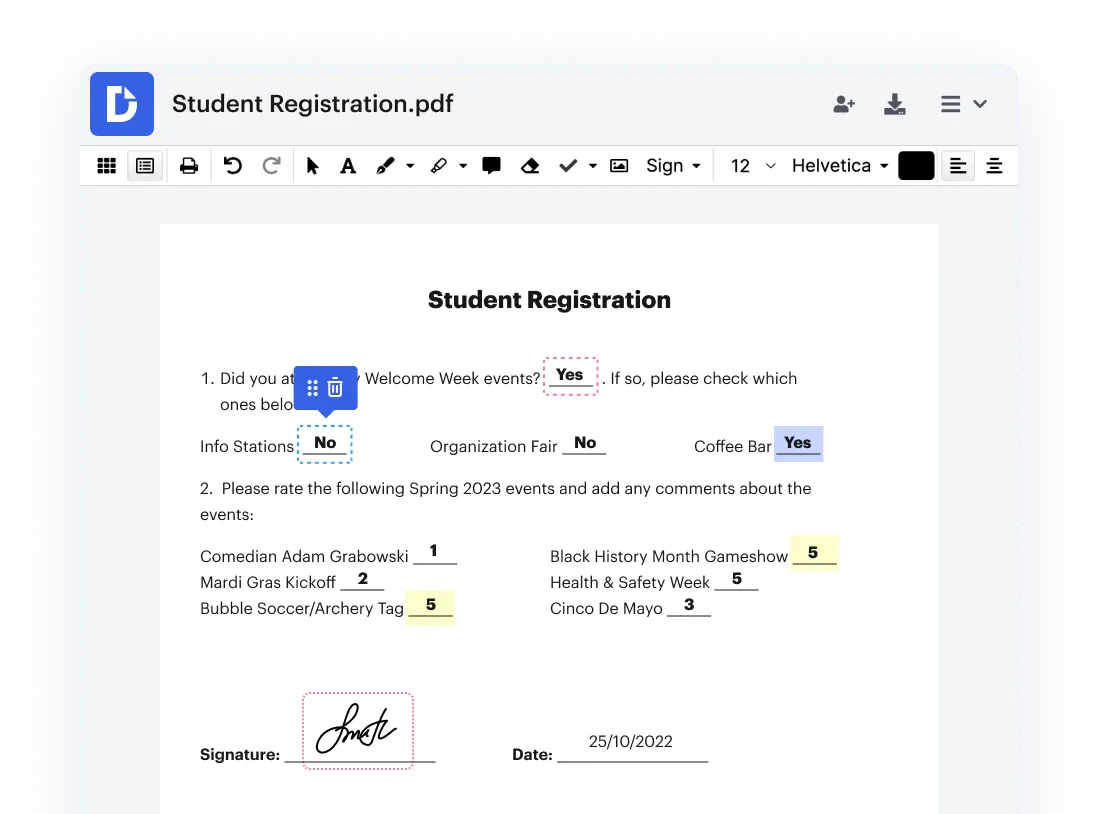
- PDF Editing: Users can edit text, add or remove images, and rearrange pages within PDF documents directly in the browser. This eliminates the need for multiple software tools and is ideal for updating contracts or correcting errors in forms.
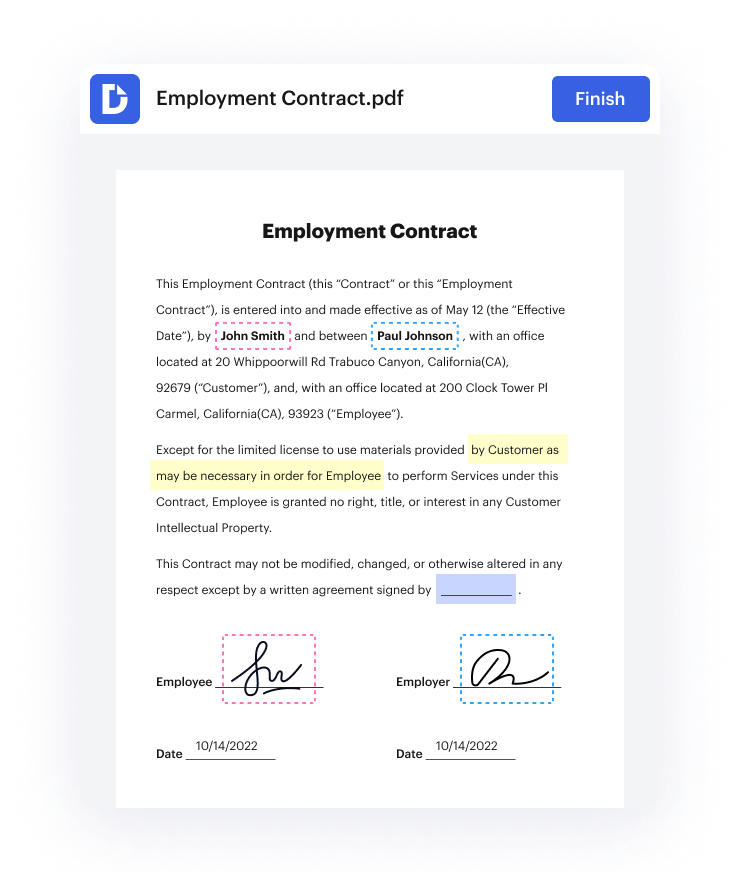
- eSignature Requests: DocHub allows sending documents to others for electronic signatures. Users can track signature status in real time, receive notifications when recipients sign, and automate reminders, which is essential for businesses managing multiple agreements.
- Reusable PDF Templates: Users can create templates for frequently used documents, such as invoices, contracts, or consent forms. Templates save time by pre-populating fields and layouts, reducing repetitive work and ensuring consistency across documents.
- Google and Gmail Integration: The platform integrates natively with Google Drive and Gmail, allowing users to open, edit, and save PDFs from these services without leaving their familiar environments. This integration supports efficient document workflows within commonly used tools.
- Annotation Tools: DocHub offers a full suite of annotation options including highlighting, underlining, strikethrough, adding sticky notes, and drawing shapes or freehand sketches. These tools facilitate review processes, collaboration, and feedback.
- Cloud Storage and Accessibility: Documents are stored securely on DocHub’s servers, enabling access from any device with internet connectivity. This cloud storage supports version control and collaborative editing, making it easier for teams to work together.
- Instant Sign-Up and Browser-Based Access: Users can start using DocHub immediately without downloads or installations. This accessibility is advantageous for users on different platforms or those who prefer not to install additional software.
- Security Features: DocHub employs encryption protocols to secure documents during upload, storage, and sharing. It complies with industry standards to protect sensitive information, making it suitable for confidential contracts and legal documents.
Pricing
DocHub’s pricing structure is tiered to accommodate different user needs. While the free plan offers basic editing and signing functionalities, paid subscriptions unlock enhanced features such as unlimited document sending, advanced PDF editing tools, reusable templates, and priority customer support. The vendor maintains a pricing page that details plan options and feature comparisons to help users select the best fit for their requirements. This approach allows casual users to access fundamental tools without cost, while businesses can scale up for more comprehensive capabilities.
Users considering DocHub should review the official pricing page to understand the most current offerings and determine which plan aligns with their document volume and feature needs. The vendor occasionally updates features and plan structures, so direct consultation of the pricing page ensures accurate information.
Pros and cons
Pros:
- Entirely browser-based, removing the need for software installation and enabling cross-platform use.
- Deep integration with Google Drive and Gmail enhances workflow efficiency for Google Workspace users.
- Supports reusable PDF templates, saving time on repetitive document creation.
- Free tier provides sufficient features for occasional users and individuals.
- Real-time tracking and notifications improve management of eSignature workflows.
- Comprehensive annotation tools facilitate document review and collaboration.
- Secure cloud storage with encryption safeguards sensitive files.
Cons:
- Advanced features such as bulk sending and expanded template options require paid subscriptions.
- Reliance on internet connectivity limits offline accessibility and editing capabilities.
- The interface, while user-friendly, may have limited customization compared to full-featured desktop PDF editors.
- Pricing details are not fully transparent within the platform and require visiting the vendor’s website.
- Users with extremely high volume or specialized PDF editing needs might find limitations in functionality.
Who should use it / who should not
DocHub is particularly suitable for professionals, small to medium-sized businesses, educators, and freelancers who require efficient, cloud-based PDF editing and signing tools. It benefits users embedded in Google Workspace environments by integrating directly with Google Drive and Gmail. Those who manage contracts, forms, or frequently updated documents will appreciate the reusable templates and real-time signature tracking.
Organizations with remote or distributed teams can leverage DocHub’s cloud accessibility and collaboration features. It is also well-suited for users who prefer not to install software or need quick access to PDF editing from multiple devices.
However, users who require extensive offline editing capabilities or advanced PDF manipulation features may find DocHub insufficient. Similarly, enterprises with very high-volume document workflows or specialized compliance needs might require more robust desktop solutions or dedicated eSignature platforms with enterprise-grade support. Users seeking fully free solutions with unlimited features might also consider alternative tools.
Alternatives to consider
- Adobe Acrobat Online: Adobe offers a powerful online PDF editor and eSignature platform with extensive features and deep integration across Adobe products. It is suitable for users needing advanced editing capabilities and strong brand support.
- Smallpdf: Known for its user-friendly interface, Smallpdf provides a variety of online PDF tools, including conversion, compression, editing, and signing. It is a solid choice for users looking for a broad set of utilities in one place.
- HelloSign: Focused primarily on electronic signatures, HelloSign integrates with popular business applications and offers streamlined signing workflows. It is ideal for organizations prioritizing eSignature efficiency over full PDF editing.
FAQ
Is DocHub free to use?
DocHub provides a free plan that includes basic PDF editing, annotation, and electronic signature features. This tier is suitable for light or occasional users. Paid plans unlock more advanced capabilities and higher usage limits.
Can DocHub integrate with Google Drive?
Yes, DocHub integrates natively with Google Drive, allowing users to open, edit, and save PDFs directly within their Drive accounts. This integration helps maintain smooth document workflows for Google Workspace users.
Does DocHub support electronic signatures?
According to the vendor, DocHub supports legally binding electronic signatures. Users can request signatures from others, track the signing progress, and send reminders, facilitating efficient agreement management.
Can I use DocHub without installing software?
DocHub operates entirely in the browser, so no software installation is required. Users can upload, edit, sign, and share PDFs online from any compatible device with internet access.
Are templates reusable in DocHub?
Yes, DocHub allows users to create reusable PDF templates. These templates help automate repetitive document creation by pre-filling fields and layouts, saving time and ensuring consistency.
Is DocHub secure?
DocHub employs encryption and complies with standard security protocols to protect documents during upload, storage, and sharing. This makes it suitable for handling sensitive or confidential information.
Verdict
DocHub offers a flexible, browser-based PDF editing and electronic signature platform that integrates well with Google services, making it a strong choice for users embedded in those ecosystems. Its reusable templates, annotation tools, and real-time signature tracking enhance productivity for professionals and small businesses. While advanced features require paid plans, the free tier provides useful functionality for casual users. Overall, DocHub delivers accessible, cloud-based PDF management without the complexity of desktop software installations.