How to Compare E-Signature Pricing Before You Buy
E-signature tools look similar until you read the envelope cap, the user ceiling and the overage rate. A five-row method, filled from the DocuSign, Dropbox Sign and PandaDoc pricing pages as of October 2026.
This article is a documentation review: it is based on the vendors' own published pages, checked on the date shown. We may earn a commission from some links; it never affects what we recommend.
The seat price on an e-signature pricing page is the least useful number on it. What decides your annual cost is how many documents each seat may send, how many seats the plan allows before you have to call sales, and what a document costs once the allowance is gone. Those three rows differ sharply between DocuSign, Dropbox Sign and PandaDoc. This note builds a five-row comparison and fills it from each vendor's own pricing page, read on October 10, 2026. Where a vendor publishes no figure, the row says so. For the billing models underneath, see per seat, per contact or per credit.
Count the documents each seat may send
This is the row that separates the three vendors most. DocuSign meters sends; Dropbox Sign does not; PandaDoc meters only on its lower tiers.
DocuSign's plans and pricing page lists Personal at $11 a month on an annual commitment of $132, with 5 envelopes per month for a single user. Standard is $30 per user per month, $360 per user per year, with 100 envelopes per user per year.
Business Pro is $45 per user per month, $540 per user per year, also with 100 envelopes per user per year. Enhanced Plans show a custom limit and require a sales conversation.
Editorial note: 100 envelopes per user per year is about 8 a month. A team sending 20 agreements a month would exhaust a Standard allowance in ten months.
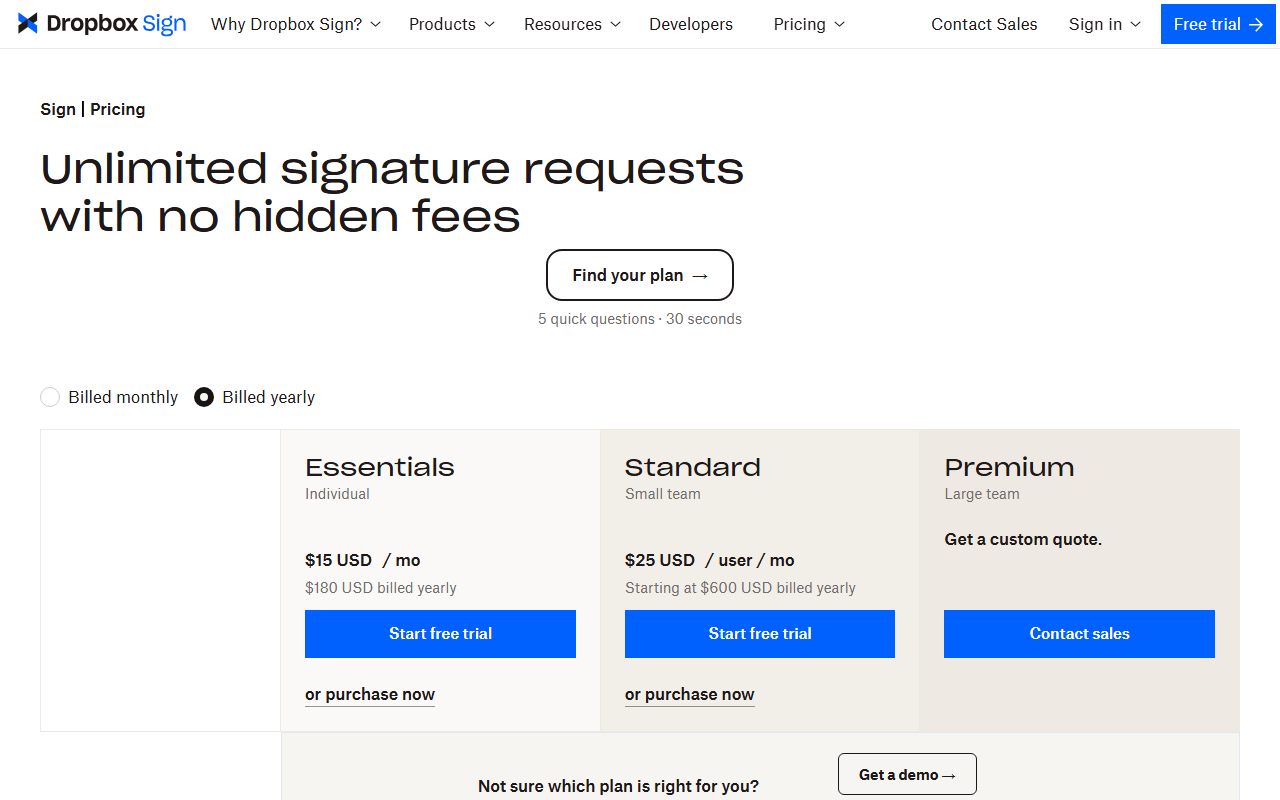
Dropbox Sign takes the opposite approach. Its pricing page states unlimited signature requests with no hidden fees on every plan, and meters templates instead: 5 on Essentials, 15 on Standard, unlimited on Premium.
PandaDoc sits between them. The Free plan allows 5 documents created per month through the interface, while Starter and Business are listed with unlimited document uploads and e-signatures.
Check the user ceiling, not just the user price
Two of the three vendors stop at a number. DocuSign's Standard and Business Pro plans are both listed for up to 50 users; past that the page points you to Enhanced Plans and a sales call.
Dropbox Sign's ceiling is much lower. Essentials covers 1 sender. Standard covers 2 or more users up to 5, with contact sales required beyond 5. Premium starts at 5 or more users and is quoted individually.
So a six-person signing team cannot self-serve on Dropbox Sign at all. That is a different buying process, and it belongs in your timeline as well as your budget.
PandaDoc publishes no seat ceiling on its plan cards. Its Enterprise tier offers per-seat or per-document pricing, and the page also advertises a document-based package with unlimited seats.
Price the overage, because document caps are soft at a price
PandaDoc is the only one of the three that publishes a per-document overage rate. Its pricing FAQ, checked October 10, 2026, lists $3.50 per document on Starter Monthly, $2 for Starter Annual and $2.60 for Business Monthly.
The same FAQ says unused documents do not roll over between billing periods, although annual plans let the full yearly allocation be used at any point.
DocuSign's page does not publish an overage rate for envelopes above the included allowance. Dropbox Sign does not need one, since its signature requests are unlimited on all three plans.
The general pattern is worth internalising before you sign anything metered; see what happens when a SaaS usage limit runs out.
Separate automated sending from human sending
Documents sent by software are often on a different meter from documents sent by people. PandaDoc makes this explicit with Usage Credits.
A Usage Credit is consumed when a document is created through an integration or automated workflow, such as the API, Zapier, Make, web forms or bulk send. Starter and Business include trial credits for first-time customers only.
The failure mode is sharp. PandaDoc states that API usage has no pay-per-document overage, and that once Usage Credits reach zero, API calls are rejected until you buy more credits or upgrade. The account stays active.
- DocuSign: 5 envelopes a month on Personal; 100 envelopes per user per year on Standard and Business Pro; custom on Enhanced Plans.
- Dropbox Sign: unlimited signature requests on all plans; templates capped at 5, 15 or unlimited.
- PandaDoc: 5 documents a month on Free; unlimited on Starter and Business; API and automation sends consume separate Usage Credits.
- Overage published: PandaDoc only, at $2 to $3.50 per document depending on plan and billing period.
- Hard stop published: PandaDoc API calls are rejected at zero credits with no pay-as-you-go option.
Decide what SSO and data residency will add
Advanced admin controls move the tier, as they do across SaaS. Dropbox Sign lists SSO and an advanced admin console, multi-teams, data residency and advanced reporting on Premium, which is a custom quote.
Its Standard plan lists SMS authentication and SSO as available, at $25 per user per month, or $17.50 billed yearly with a $420 annual minimum.
PandaDoc places single sign-on, team workspaces, CPQ, workflow automation and notary on Enterprise, and its comparison table marks SSO as optional, meaning a paid add-on rather than an included feature.
That is the same shape as the rest of the market; the tier maths is set out in what SSO and audit logs cost as SaaS add-ons.
Fill five rows, then pick on the row that will break first
Write your monthly document volume, signer headcount and automation plans at the top of the page.
Fill them on one day, in one currency, from the page itself. The same discipline applies to free-tier comparisons, as in how to compare CRM free plans, and to capped meeting tools, as in how to read a video conferencing pricing page.
- Seat price: DocuSign $11 single user, $30 Standard, $45 Business Pro; Dropbox Sign $15 Essentials, $25 Standard; PandaDoc $0 Free, $19 Starter, $49 Business.
- Send allowance: DocuSign 5 a month or 100 per user per year; Dropbox Sign unlimited; PandaDoc 5 a month on Free, unlimited on paid.
- Seat ceiling: DocuSign up to 50 users; Dropbox Sign 1, then up to 5, then quoted; PandaDoc not published.
- Overage: PandaDoc $2 to $3.50 per document; DocuSign not published; Dropbox Sign not applicable.
- Admin tier: Dropbox Sign SSO from Standard, full controls on Premium quote; PandaDoc SSO on Enterprise and marked optional.
Two tools we could not include: the Adobe Acrobat business pricing page returned a 404 and the SignNow pricing page redirected to a payment host that published no plan table on October 10, 2026. Rather than guess, they are left out.
Bottom line
If volume is unpredictable, unlimited beats a large allowance. Dropbox Sign publishes unlimited signature requests from $15 per user per month, or $10.05 billed yearly at $120.60 a year, for a single sender.
If headcount is the constraint, DocuSign self-serves to 50 users where Dropbox Sign stops at 5. If automation is the constraint, PandaDoc is the only one of the three publishing both a per-document rate and a credit model.
Confirm the annual commitment first. DocuSign states that plans and packaging may be valid for new customers only, and offers a 30-day money-back guarantee on annual subscriptions bought on its own site.
The discount arithmetic is in what annual billing discounts actually save, and the decision that comes before it is in free trial or free plan.
Frequently asked questions
How many documents does DocuSign let you send?
Personal includes 5 envelopes per month for one user. Standard and Business Pro both include 100 envelopes per user per year, which is roughly 8 a month, and both are listed for up to 50 users. Higher volumes move to Enhanced Plans with a custom limit, per the pricing page checked October 10, 2026.
Is Dropbox Sign really unlimited?
The pricing page states unlimited signature requests with no hidden fees on all plans, as of October 10, 2026. The limits sit elsewhere: 1 sender on Essentials at $15 per user per month, 2 to 5 users on Standard at $25, and templates capped at 5 and 15 respectively.
What happens if you exceed a PandaDoc document limit?
You can upgrade or keep sending at a published per-document rate: $3.50 on Starter Monthly, $2 on Starter Annual and $2.60 on Business Monthly. API sending works differently, with calls rejected once Usage Credits reach zero, per the pricing FAQ checked October 10, 2026.
Which e-signature plan is cheapest for a five-person team?
On list figures checked October 10, 2026, PandaDoc Starter at $19 per seat per month billed annually is $95 a month, Dropbox Sign Standard at $17.50 billed yearly is $87.50, and DocuSign Standard at $30 is $150. Dropbox Sign requires a sales call above 5 users.
Do any of these plans include SSO without a sales call?
Dropbox Sign lists SSO as available on Standard, which is self-serve up to 5 users. PandaDoc places SSO on Enterprise and marks it optional, meaning a paid add-on. DocuSign's self-serve page does not publish an SSO row, as of October 10, 2026.
Sources
- DocuSign plans and pricing: eSignature (envelope and user limits) (checked Oct 10, 2026)
- Dropbox Sign plans and pricing (Essentials, Standard, Premium) (checked Oct 10, 2026)
- PandaDoc pricing and pricing FAQ (overage rates, Usage Credits) (checked Oct 10, 2026)