How to Read a Video Conferencing Pricing Page
Participant caps, meeting duration and recording storage decide which tier you need, not the feature list. A four-row method filled from the Zoom, Google Workspace and Microsoft Teams pricing pages, as of October 2026.
This article is a documentation review: it is based on the vendors' own published pages, checked on the date shown. We may earn a commission from some links; it never affects what we recommend.

A video conferencing pricing page has four rows that matter and a long feature list that mostly does not. The four are the participant cap, the maximum meeting duration, the recording storage included per licence, and whether the cap can be raised with an add-on instead of a tier change. Get those four right and the feature list rarely changes your decision. This note fills them from the Zoom, Google Workspace and Microsoft Teams pages as read on October 10, 2026, and flags one place where a vendor's own pages disagree. For the broader seat-counting problem, see per seat, per contact or per credit.
Read the participant cap as the price of the tier
The participant cap is what you are actually buying. Zoom's pricing page, checked October 10, 2026, lists Basic as free with 100 participants per meeting, Pro with 100, Business with 300 and Enterprise with 1000 on a contact sales basis.
Google Workspace sets its Meet caps lower at the entry tiers. The pricing page lists 100 participants on Business Starter, 150 on Business Standard, 500 on Business Plus and 1000 on Enterprise, which is contact sales.
Microsoft publishes a single figure. Its Teams business comparison page shows a participant capacity of 300 and a maximum meeting duration of 30 hours across the plans with Teams included.
So 300 attendees costs a tier jump at Zoom and Google, and is the default at Microsoft. If your largest recurring meeting is an all-hands, that one number should drive the shortlist.
Check whether the vendor's own pages agree
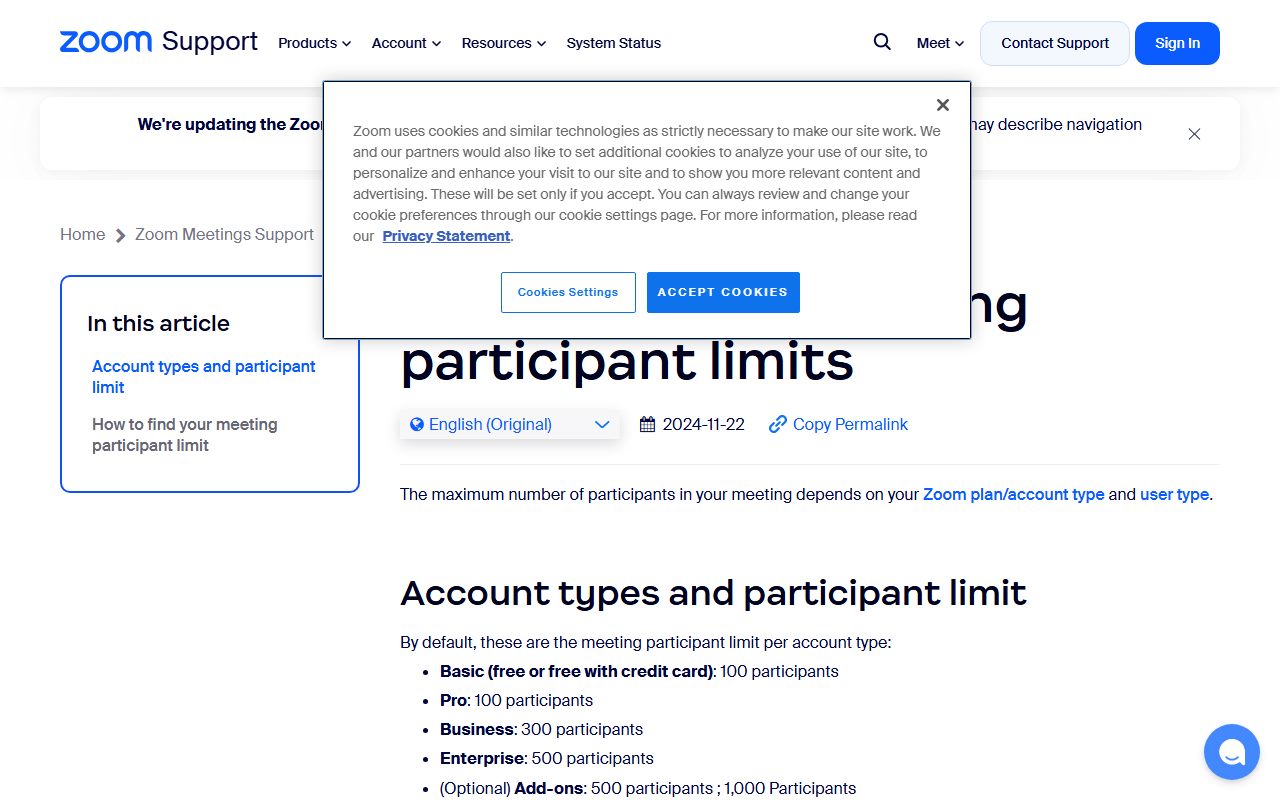
Zoom's pages did not match on October 10, 2026. The pricing page shows Enterprise at 1000 participants, while the Zoom support article on understanding meeting participant limits lists Enterprise at 500 participants.
The same support article lists Basic at 100, Pro at 100 and Business at 300, which does match the pricing page. It also lists Large Meeting add-ons at 500 participants and 1,000 participants.
The reconciliation is probably that Enterprise defaults to 500 and reaches 1000 with the add-on, but neither page says so. Treat it as a question for the sales call, not a figure to budget from.
This is a general habit worth keeping. When a pricing page and a support article disagree, the support article usually describes the account you will actually get.
Price the meeting clock separately from the cap
Duration limits are the cheapest feature to buy and the easiest to forget. Zoom's Basic plan is free but capped at 40 minutes per meeting; Pro, Business and Enterprise are all listed at 30 hours.
Microsoft's Teams comparison also shows 30 hours as the maximum meeting duration, and describes Teams Essentials as allowing you to meet all day up to 30 hours with up to 300 participants.
Google's pricing page does not publish a meeting duration row in the plan comparison we read. Treat it as unpublished rather than unlimited and confirm it before standardising on long workshops.
The practical reading: if 40 minutes is your only problem, the first paid tier solves it. Zoom Pro is listed at $16.99 per user per month billed monthly, or $14.16 billed annually.
Count the recording storage per licence, not per account
Recording is where a cheap plan becomes expensive. Zoom lists local recording only on Basic, 10 GB of cloud storage per user on Pro, 10 GB per licence on Business, and unlimited cloud storage on Enterprise.
Google ties recording to the tier rather than to storage. Business Starter, at 30 GB of pooled storage per person, is listed without recording. Business Standard adds meeting recordings saved to Google Drive and raises storage to 2 TB per user.
Business Plus is listed at $22 per user per month with 5 TB per user, and Enterprise at 5 TB with the option to upgrade for more, on a contact sales basis.
Microsoft's comparison lists 10 GB of cloud storage per user on Teams Essentials and 1 TB per user on the Microsoft 365 business plans, with additional storage available as a pre-purchase or on a pay-as-you-go basis.
- Zoom: Basic free, 40 minutes, 100 participants, local recording only.
- Zoom Pro: $16.99 monthly or $14.16 annually per user, 30 hours, 100 participants, 10 GB cloud per user.
- Zoom Business: $21.99 monthly or $18.33 annually per user, 30 hours, 300 participants, 10 GB cloud per licence.
- Google Workspace: Business Starter $7.00, Business Standard $14.00, Business Plus $22.00 per user per month, with Meet caps of 100, 150 and 500.
- Microsoft: Teams Essentials $4.00 per user per month paid yearly, Microsoft 365 Business Basic $7.00, Business Standard with Copilot $23.50, all showing 300 participants and 30 hours.
Watch the introductory price and the unbundled variants
Google's entry prices on the page are introductory. Business Starter shows $3.50 for the first 12 months and limited to 20 users, against a regular figure of $7.00. Business Standard shows $8.40 introductory against $14.00 regular.
Budget from the regular figure. An introductory rate that doubles in month 13 is a renewal problem, not a saving; the same arithmetic applies to annual terms in what annual billing discounts actually save.
Microsoft now publishes plans with and without Teams. Business Basic is $7.00 per user per month paid yearly, while Business Basic (no Teams) is $5.40. Business Standard with Copilot is $23.50, and the no-Teams variant is $20.30.
The gap is the price of the conferencing component inside a productivity suite. By the editors' subtraction, that is $1.60 to $3.20 per user per month on those two pairs.
Microsoft also sells capability as add-ons rather than tiers: Teams Premium at $10.00 per user per month, Teams Phone Standard at $10.00, and Teams Rooms Pro at $40.00, as of October 10, 2026.
Bottom line
Pick on the participant cap first, the meeting clock second, and recording storage third. Everything else on the page is a tie-breaker.
For meetings up to 300 people, Microsoft's $4.00 Teams Essentials is the cheapest published route, and Zoom Business at $18.33 annually is the cheapest standalone one. For 500 attendees, Google Business Plus at $22.00 is the only self-serve figure of the three.
One caution we could not resolve: the Webex pricing page returned HTTP 403 on October 10, 2026, so Cisco is absent from this comparison rather than estimated. The honest habit is covered in free trial or free plan.
Related reading on the same reading method: how to compare project management software pricing, what SSO and audit logs cost as SaaS add-ons, what happens when a SaaS usage limit runs out and how per-user pricing works with contractors.
Frequently asked questions
How many people can join a Zoom meeting on each plan?
Zoom's pricing page lists 100 participants on Basic and Pro, 300 on Business and 1000 on Enterprise. Zoom's support article on participant limits lists Enterprise at 500 instead, with Large Meeting add-ons at 500 and 1,000, as of October 10, 2026. Confirm the figure in your order form.
Does Google Meet record on the cheapest plan?
No. Google Workspace's pricing page lists Business Starter without meeting recordings, at $7.00 per user per month regular or $3.50 introductory for the first 12 months, limited to 20 users. Recordings saved to Google Drive begin on Business Standard at $14.00, checked October 10, 2026.
What is the cheapest plan that hosts 300 participants?
Microsoft Teams Essentials at $4.00 per user per month paid yearly, which the comparison page lists with 300 participant capacity, 30 hours per meeting and 10 GB of cloud storage per user. Zoom reaches 300 on Business at $18.33 per user per month billed annually, as of October 10, 2026.
Is there a meeting length limit on paid plans?
Zoom lists 30 hours on Pro, Business and Enterprise, against 40 minutes on free Basic. Microsoft also lists 30 hours as the maximum meeting duration on plans that include Teams. Google Workspace's plan comparison did not publish a duration row on October 10, 2026.
Why does Microsoft sell plans without Teams?
The comparison page lists both variants, such as Business Basic at $7.00 per user per month paid yearly and Business Basic (no Teams) at $5.40. The difference, by the editors' subtraction, is $1.60 per user per month, which is a useful proxy for the conferencing component.
Sources
- Zoom Workplace pricing (plan rates, participant caps, recording storage) (checked Oct 10, 2026)
- Zoom support: understanding meeting participant limits (checked Oct 10, 2026)
- Google Workspace pricing (plan rates, storage, Meet participant caps) (checked Oct 10, 2026)
- Microsoft Teams business plan comparison (rates, 300 participants, 30 hours) (checked Oct 10, 2026)